# expand
A compact prompt with the ability to expand and select available choices.
## Example
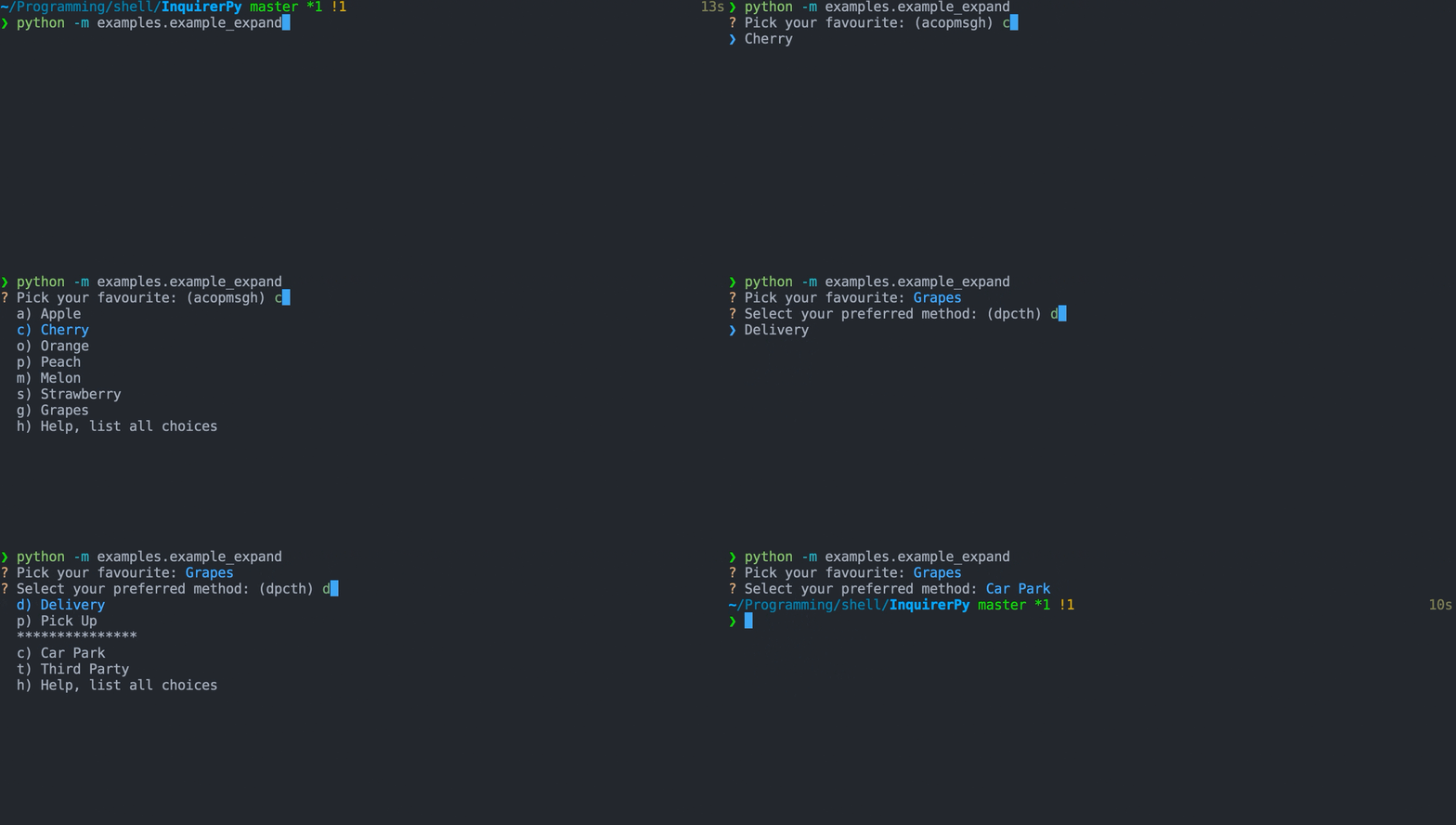
Classic Syntax (PyInquirer)
```{eval-rst}
.. literalinclude :: ../../../examples/classic/expand.py
:language: python
```
Alternate Syntax
```{eval-rst}
.. literalinclude :: ../../../examples/alternate/expand.py
:language: python
```
## Choices
```{seealso}
{ref}`pages/dynamic:choices`
```
```{tip}
Avoid using character such as `h`, `j` and `k` as the key of choices since they are already taken and used as the default
expansion key or navigation key.
```
```{tip}
It is recommended to use {class}`~InquirerPy.prompts.expand.ExpandChoice` to create choices for expand prompt.
However if you prefer {class}`dict` chocies, in addition to the 2 required keys `name` and `value`, an additional
key called `key` is also required. The value from `key` should be a single char and will be binded to the choice. Pressing
the value will jump to the choice.
```
For this specific prompt, a dedicated class {class}`~InquirerPy.prompts.expand.ExpandChoice` is created.
```{eval-rst}
.. autoclass:: InquirerPy.prompts.expand.ExpandChoice
:noindex:
```
```{code-block}
from InquirerPy.prompts.expand import ExpandChoice
choices = [
ExpandChoice("Apple", key="a"),
ExpandChoice("Cherry", key="c"),
ExpandChoice("Orange", key="o"),
ExpandChoice("Peach", key="p"),
ExpandChoice("Melon", key="m"),
ExpandChoice("Strawberry", key="s"),
ExpandChoice("Grapes", key="g"),
]
```
## Keybindings
```{seealso}
{ref}`pages/kb:Keybindings`
```
```{hint}
In addition to the keybindings mentioned below, keybindings are created for all the `key` specified for each choice which you can
use to jump to the target choce.
```
```{include} ../kb.md
:start-after:
:end-before:
```
```{include} ./list.md
:start-after:
:end-before:
```
```{include} ./list.md
:start-after:
:end-before:
```
## Multiple Selection
```{seealso}
{ref}`pages/prompts/list:Multiple Selection`
```
## Default Value
```{seealso}
{ref}`pages/prompts/list:Default Value`
```
The `default` parameter for expand prompt can be two types of values:
- shortcut char (str): one of the `key` assigned to the choice.
- choice value (Any): default value could the value of one of the choices.
## Expand and Help
By default, the expand shortcut is bonded to `h` char and the help message is `Help, List all choices.`.
If you would like to have a different key for expansion or help message, you can change this behavior via `expand_help` parameter.
The `expand_help` parameter accepts value that's an instance of `ExpandHelp`.
```{eval-rst}
.. autoclass:: InquirerPy.prompts.expand.ExpandHelp
:noindex:
```
The following example will change the expansion key to `o` and the help message to `Help`.
Classic Syntax (PyInquirer)
```{code-block} python
from InquirerPy import prompt
from InquirerPy.prompts.expand import ExpandHelp
questions = [
{
"type": "expand",
"message": "Select one:",
"choices": [{"key": "a", "value": "1", "name": "1"}],
"expand_help": ExpandHelp(key="o", message="Help"),
}
]
result = prompt(questions=questions)
```
Alternate Syntax
```{code-block} python
from InquirerPy import inquirer
from InquirerPy.prompts.expand import ExpandHelp
result = inquirer.expand(
message="Select one:",
choices=[{"key": "a", "value": "1", "name": "1"}],
expand_help=ExpandHelp(key="o", message="Help"),
).execute()
```
## Reference
```{eval-rst}
.. autoclass:: InquirerPy.prompts.expand.ExpandPrompt
:noindex:
```